Getting Started in Plane Crash Simulator
Spawn, fly, crash, and unlock — a calm first session from join to first big impact.
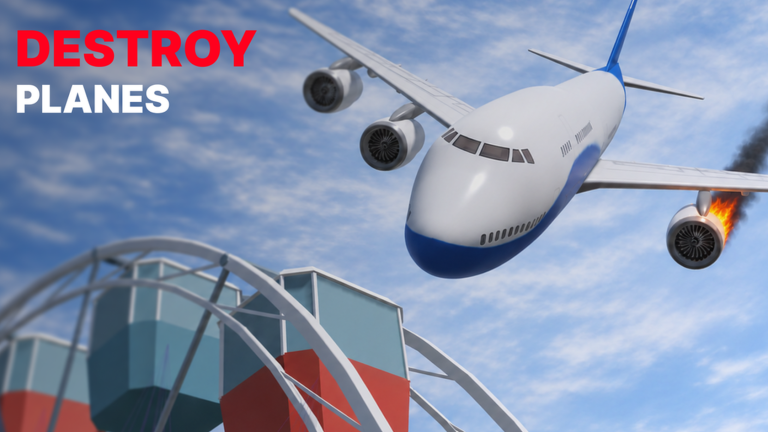
Plane Crash Simulator on Roblox is built by REgelly150 as a free-to-play crash sandbox. You spawn aircraft, fly a shared map with up to 14 players, and smash into destructible landmarks for Crash Points. The experience launched 2025-10-30, sits around version 3.70, and has climbed past 126 million visits. This getting-started guide walks your first session so you learn controls, claim free currency, and find worthwhile targets without wasting the first hour.
Step 1 — Join and orient
Open the official experience from Roblox on PC, mobile, or console through the Roblox client. After loading, take a breath and locate the main menus: aircraft selection, spawn actions, settings or gear icons, and the gift or codes entry. Servers are social but not a race — other pilots will be diving stadiums and carriers while you practice. If the map feels busy, fly away from the densest props until your hands settle.
Step 2 — Spawn your first plane
Open the aircraft menu and pick something forgiving. Early on, a mid-size airliner or a simple fighter is fine; you do not need the heaviest bomber yet. Confirm the spawn so the plane appears on the map, then hop in. If you lose the craft or clip oddly, respawn another — the loop is designed around repeated takeoffs and impacts. Remember that the free-to-play path unlocks planes and areas through Crash Points rather than locking the map behind paywalls.
Step 3 — Practice in open sky
Before you aim at buildings, climb into clear air. Practice pitch up and down, gentle banks, throttle changes, and recovering from unusual attitudes. The fastest way to ruin a first session is diving the stadium while still fighting the camera. Spend several minutes in open sky until turns feel predictable. When inputs feel wrong, jump to the dedicated Controls guide for PC keybinds, mobile UI notes from the 3.60 refresh, and lag troubleshooting.
Step 4 — Redeem codes early
Crash Points buy progression. Before a long grind, redeem every working code from the Codes Hub. In-game, open the gear or gift style codes UI, paste carefully (codes are usually case-sensitive), and confirm rewards. Fresh Crash Points let you unlock better airframes sooner and experiment without only scraping tiny hits. Recheck the codes page after updates — REgelly150 often drops new strings with milestones and seasonal events.
Step 5 — Explore the map safely
Once stable, tour the landmark loop at medium altitude. Prioritize spotting:
- The stadium with large stands and interior structure for big demolitions.
- The military base, which became more interactive and can react when you overfly — approach with care.
- The aircraft carrier for sea-level approaches and carrier-deck experiments.
- Ferris wheels and cliffside lighthouses added as smashable props in later map updates.
Do not force every object. Some scenery lacks full break physics; if a hit does nothing, move on. For approach angles and danger notes, continue with Map Targets.
Step 6 — Make your first intentional crash
Climb for altitude, then dive to build speed into a known destructible prop — stadium seating is a classic first spectacle. Heavier planes generally throw more debris; lighter fighters teach precision. After impact, note how Crash Points tick up. Later you can graduate to multi-pass demolitions and the upside-down wing-scrape farming style covered in Crash Points and cinematic setups in Best Crashes.
Step 7 — Pick a first aircraft goal
Use early Crash Points deliberately. Skim the Tier List Hub for community-minded rankings of airliners, fighters, bombers such as the 707, Eurofighter, B-2, B-1, A380, helicopters, and other unlocks. Beginners often want either a sturdy heavy for destruction or a nimble jet for learning attitude control. Avoid dumping everything into cosmetics if a workhorse airframe will farm points faster.
First-hour checklist
- Spawn any available plane and leave the spawn clutter.
- Practice climb, dive, and bank in empty sky.
- Redeem codes via gear or gift UI — see Codes.
- Fly a scout pass over stadium, base, carrier, Ferris wheels, and lighthouses.
- Dive one solid destructible target for your first big crash.
- Note Crash Points gained and open the tier list for your next unlock.
- Bookmark Controls if mobile or PC inputs still feel off.
Common beginner mistakes
- Crashing immediately without open-sky practice, then blaming the game for “bad physics.”
- Ignoring codes and grinding slowly when free Crash Points are sitting unused.
- Treating the military base like a harmless prop field — it can be interactive and surprising.
- Expecting every prop to shatter; learn the reliable targets from the map guide.
- Buying random planes without checking the Tier List Hub or farming methods.
What to read next
- Controls — device-specific input and troubleshooting.
- Map Targets — landmark approaches and danger zones.
- Crash Points — farming and leaderboard methods.
- Best Crashes — altitude, heavy frames, multi-pass spectacle.
- Guides Hub — full tutorial index.
- Players Hub — crash-count boards and climbing tips.
Finish this page by spawning one more plane, climbing high, and diving a stadium stand with intention. That single clean run teaches more than ten random cartwheels — and it sets up every advanced guide on this wiki.
Frequently Asked Questions
Quick answers to the most common questions.
What should I do first after joining Plane Crash Simulator?
Spawn a plane, practice in open sky, redeem codes from the Codes Hub, then scout stadium, carrier, and base landmarks before farming Crash Points.
Where do I redeem codes?
Use the in-game gear or gift style codes UI, paste a working code from the Codes Hub, and confirm Crash Points rewards.
Which plane should beginners unlock first?
Choose based on goal: a heavier airframe for destruction farming or a fighter for control practice, guided by the Tier List Hub.
Is the whole map free to explore?
Yes. The free-to-play loop gives access to planes and areas; Crash Points speed unlocks rather than gating the basic sandbox.
Why did my crash not destroy anything?
Some props lack full break physics. Switch to known targets like stadium structures or other landmarks covered in Map Targets.
How many players are in a server?
Servers support up to 14 players, so expect shared airspace around popular crash sites.